What is Smart Redirection? Device and Location-Based Routing
Smart Redirection is one of the most powerful and advanced features in Trakio, allowing you to route visitors to different destinations based on their device, operating system, or geographic location.
With this feature, you can create intelligent, rule-based links that deliver personalized experiences to every user—without needing multiple URLs.
What is Smart Redirection?
Smart Redirection enables you to define multiple conditional rules that automatically send users to different destinations depending on their attributes.
Instead of creating separate links for each audience, you can use a single smart link that adapts dynamically.
Premium Feature: Smart Redirection is available exclusively in the Premium Plan. Upgrade to unlock advanced rule-based routing and targeting capabilities. Current Supported Rules: Trakio currently supports Device/Operating System targeting and Country-based targeting. Additional rule types will be introduced in future updates.
How Smart Redirection Works
Smart Redirection uses conditional logic to evaluate each visitor when they click your link.
Each rule follows this logic:
If a specific condition is met, redirect the user to the defined destination URL.
When a user opens a smart link:
- Trakio evaluates all rules in order
- The first matching rule is applied
- The user is redirected to the corresponding destination
Device and Operating System Targeting
Device-based targeting allows you to send users to platform-specific destinations optimized for their experience.
How It Works
You define rules based on the visitor’s device or operating system and assign a destination URL for each condition.
Example Rules
Android Users:
- Condition: Device is Android
- Action: Redirect to Google Play Store or Android landing page
iOS Users:
- Condition: Device is iOS
- Action: Redirect to Apple App Store or iOS-specific page
Windows Users:
- Condition: Device is Windows
- Action: Redirect to desktop application or Windows download page
Supported Device Types
- Mobile All: All mobile devices
- Desktop All: All desktop devices
- Tablet All: All tablets
- Android: Android devices
- iOS: iPhone and iPad devices
Country-Based Targeting
Country targeting allows you to deliver region-specific experiences based on the visitor’s location.
How It Works
You define rules for specific countries and assign a destination URL for each region.
Example Rules
Pakistan:
- Condition: Country is Pakistan
- Action: Redirect to localized landing page with regional pricing and content
United States:
- Condition: Country is United States
- Action: Redirect to US-specific page with USD pricing and local offers
United Kingdom:
- Condition: Country is United Kingdom
- Action: Redirect to UK landing page with GBP pricing and compliance content
Supported Countries
Smart Redirection supports all countries worldwide. You can create targeting rules for any region globally.
Common Use Cases
App Distribution
- Android users → Google Play Store
- iOS users → App Store
- Desktop users → Web app or waitlist page
E-commerce Localization
- US users → US store with USD pricing
- EU users → EU store with GDPR compliance
- Asia users → Regional catalog and pricing
Content Personalization
- Spanish-speaking regions → Spanish content
- French-speaking regions → French content
- Default → English content
Business Targeting
- Desktop users → B2B landing pages
- Mobile users → B2C product pages
How to Create Smart Redirection Rules
Step 1: Log in to Your Trakio Account
Open the login page and sign in to your dashboard:
Trakio Login Or Sign up If New To Trakio
Step 2: Open Smart Rules Section
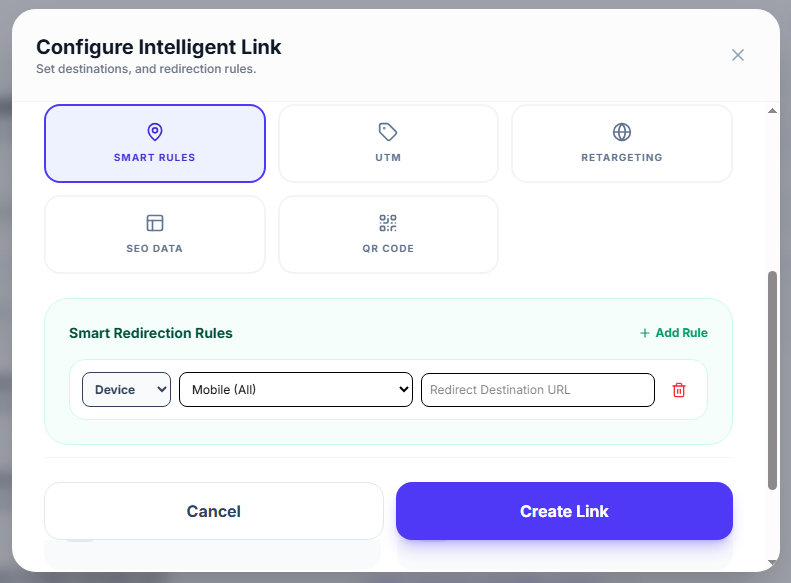
When creating or editing a link, open the Smart Rules section in the dashboard.
Step 3: Add a New Rule
- Click “Add Rule”
- Choose condition type (Device or Country)
- Select the target value
- Enter destination URL
Step 4: Define Rule Priority
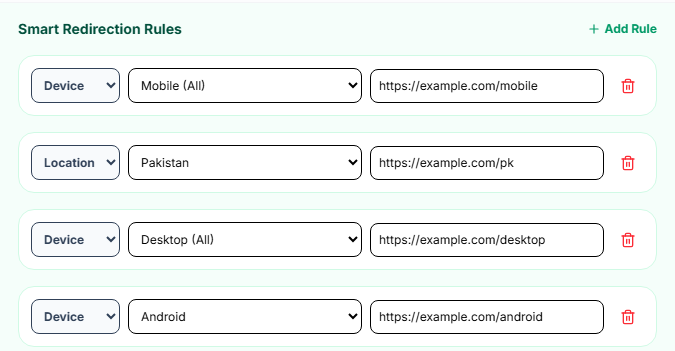
Rules are evaluated from top to bottom:
- The first matching rule is applied
- Only one rule is executed per visit
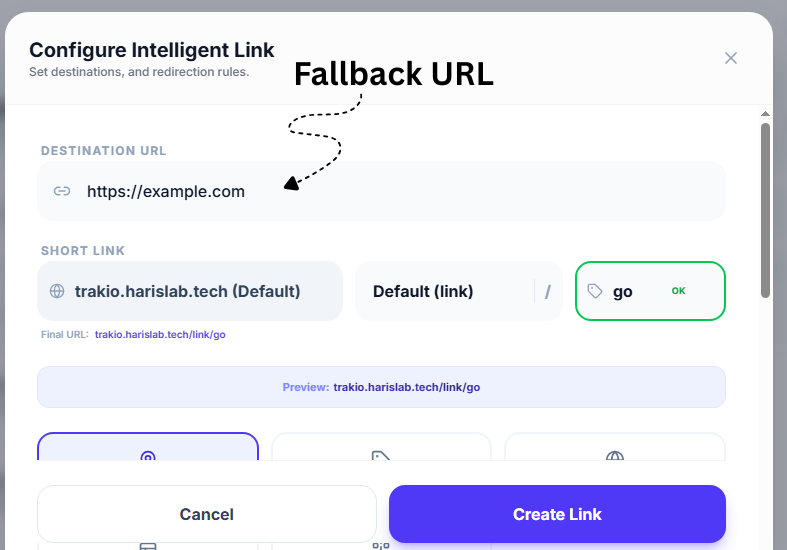
Step 5: Set a Default Destination
Always configure a fallback URL for users who do not match any rule.
Advanced Smart Redirection Strategies
Multi-Platform App Launch
- Android (Pakistan) → Google Play Store PK
- iOS (Pakistan) → App Store PK
- Android (US) → Google Play Store US
- iOS (US) → App Store US
- Others → Coming Soon page
Regional Campaign Optimization
Run targeted marketing campaigns by sending users to:
- Localized landing pages
- Region-specific promotions
- Currency-adjusted pricing pages
A/B Testing with Smart Rules
You can test performance by splitting traffic:
- 50% users → Landing Page A
- 50% users → Landing Page B
Then compare analytics results.
Best Practices
Plan Before Creating Rules
Define your targeting strategy before adding rules to avoid conflicts.
Always Include a Default Route
Ensure no user is left without a destination.
Test Across Devices
Use different devices and VPNs to verify behavior.
Keep Links Updated
Regularly review destination URLs for accuracy.
Monitor Performance
Track analytics per rule to optimize conversions.
Key Benefits of Smart Redirection
- One link for multiple audiences
- Personalized user experience
- Higher conversion rates
- Reduced campaign complexity
- Global targeting with local relevance